itsyourfuture.net / browser
THL: Local Dialogue Archive
A bilingual, searchable archive of every line spoken in The Hundred Line: Last Defense Academy, with sprite display, CG mapping, voice playback, and live in-game synchronization.
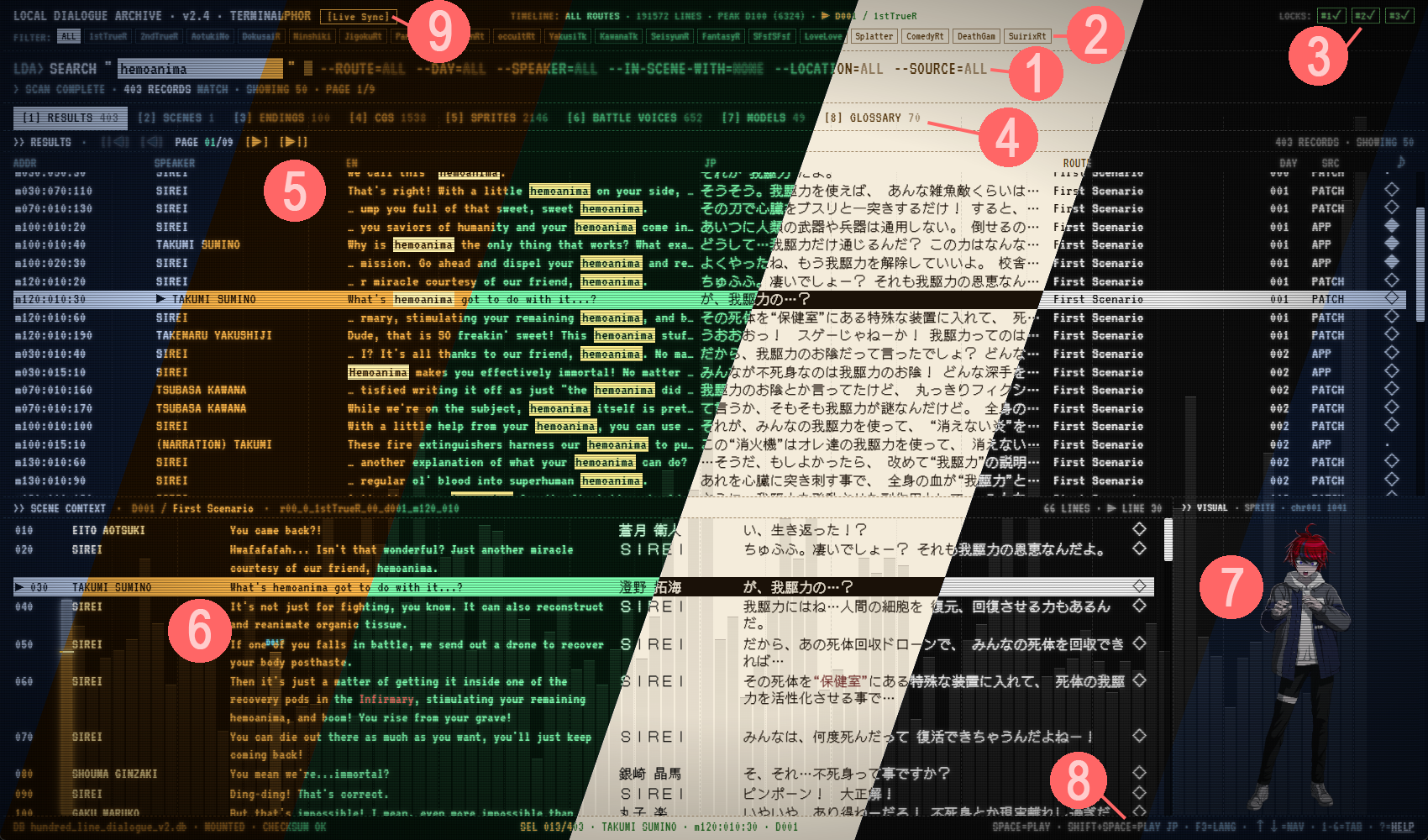
- The main set of filters: Route, Day, Speaker, and Location. Also includes a filter for showing scenes that feature a second character in addition to the speaker, and a filter for whether the results show original or patched content.
- The Route IDs. Click one and it'll show things from that route only.
- The Story Locks. You can lock or unlock these in the settings.
- Content tabs: Search results, Scenes, Endings, CGs, Sprites, Battle Voices, Models, Glossary, Decisions, Deaths, and Exploration.
- The Search Results window. Shows all of the results according to your filters.
- The Scene Context window. When you click on a search result, it jumps to that line in its corresponding scene here, so you can see what came before and after.
- The sprite or CG that matches the highlighted line of dialogue.
- The small menu. Shows controls for playing audio and changing your language. Access the main menu via "help."
- The Live-Sync module (see below).
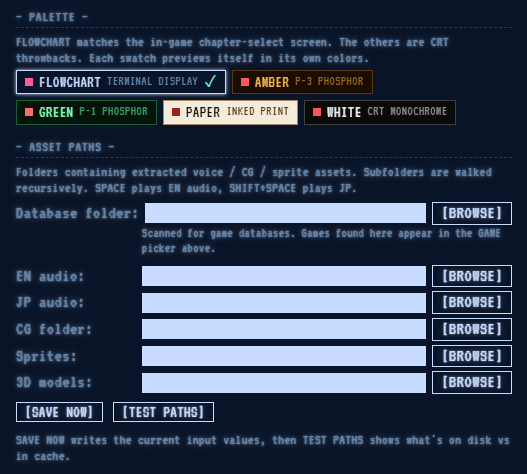
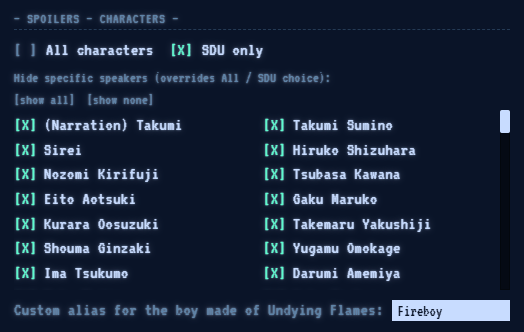
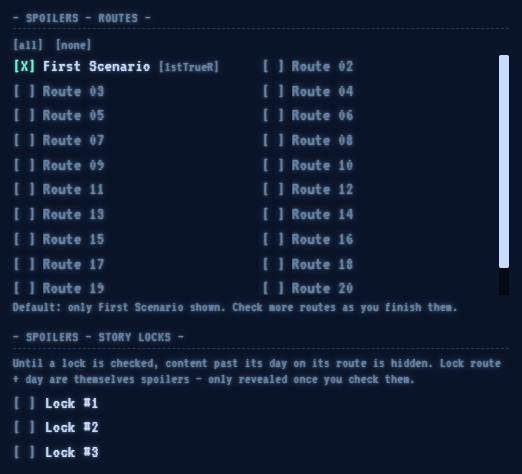
In the main menu, you can pick which color you want the browser to be. And you can configure the paths to match the ones you exported things to using the extractor program (see below). If the game is installed, the browser finds it through Steam and reads CGs straight from it, so there is no CG folder to set up. The spoiler menu can let you filter out characters and also give the ghost boy a name. It is also used to filter out routes and disable or enable the story locks.
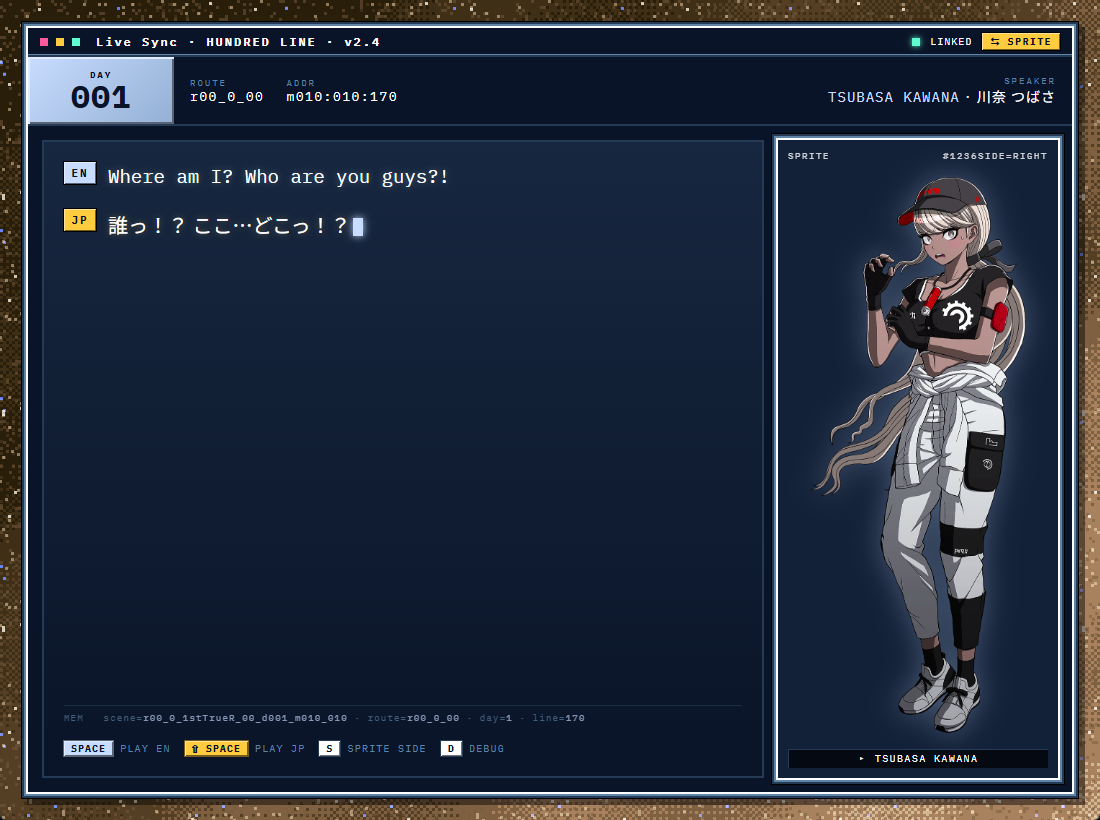
The Live-Sync module reads the game's memory and it will follow you as you progress through the game. It abides by spoiler settings. It'll show you the dialogue in both languages. You can also replay the voice files in both languages from here.
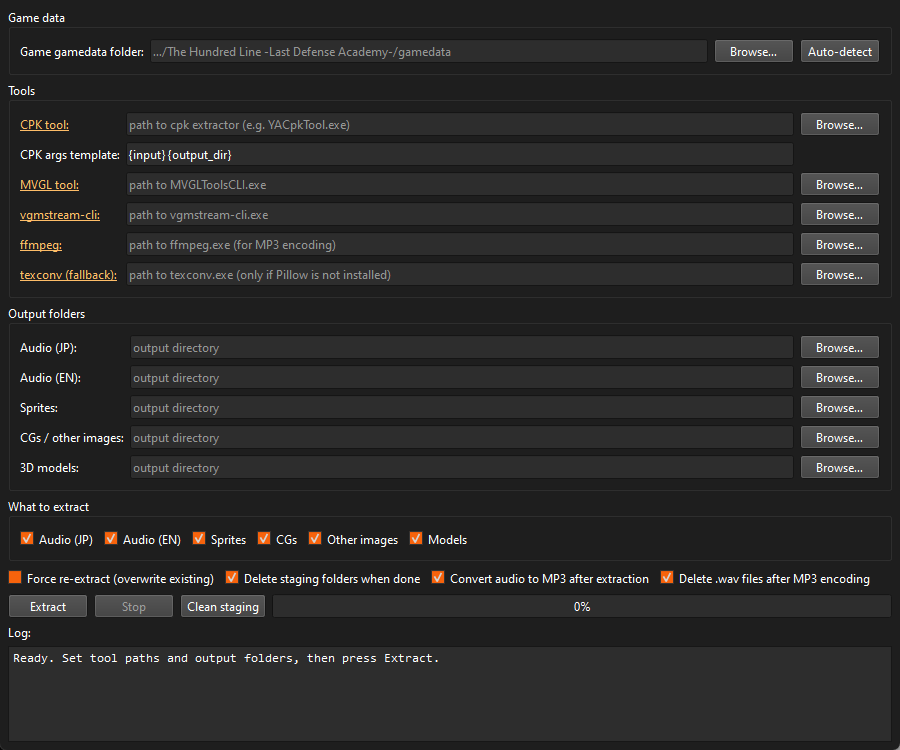
This is a simple GUI for Hundred Line file extraction. Gather up all the tools and define their paths. Then choose where you want things to be exported. You can export the game's audio (both languages), Sprites, and 3D models (with their battle effects) with this. It can still export CGs and other images too, but the browser no longer needs them if the game is installed. Once you extract the files, be sure to point the main browser to the same locations you used here.
- OS
- Windows 10 / 11 (64-bit)
- Disk (minimum)
- ~1.0 GB — browser + main database. Text search works on its own; with the game installed you also get CGs, ending art and glossary images, read straight from the game.
- Disk (with audio + sprites)
- ~5.5 GB — adds English voice (1.3 GB), Japanese voice (1.3 GB), sprite cache (1.7 GB)
- Disk (with 3D models)
- adds ~0.7 GB, battle effects included
- CG art
- No longer extracted (it used to take ~55 GB). The browser keeps a small cache of thumbnails and of the CGs you open at full size.
- RAM
- 4 GB recommended
- Game
- The Hundred Line: Last Defense Academy on Steam. Needs to be installed for CGs without extracting them; build v1.3.0 for live sync (older builds work without it).
- Video export
- Optional:
ffmpegon your PATH
-
File Extractor — Windows
60 MB -
Local Dialogue Archive — source code
4.1 MB -
File Extractor — source code
237 KB
// v2.6.54 · released 2026-10-10
Everything that changed since v2.6.20. If you extracted models before, export them again with File Extractor v1.0.4 to get the battle effects.
- NEWCGs straight from the game. With the game installed, CGs, ending art and glossary images are read directly from its files. The ~55 GB CG extraction is no longer needed. The first visit to the CG tab builds thumbnails and shows a progress bar.
- NEWGame folder setting. The browser finds the game through Steam by itself. A new Game folder row under Asset Paths shows what it found and lets you point to the game by hand.
- NEWDeaths tab. A ledger of 226 deaths across every route: who dies, who kills them and in what form, how, and on which day. Sort it, filter by victim or killer, open a tally of who dies and kills most, and jump straight to the death scene or to the scene where the killer is revealed. Follows your spoiler settings.
- NEWExploration tab. All 184 board-game events: the space text, every option, both outcomes of each option and their odds, in all four languages.
- NEWExport video. Right-click a voiced line (or press Ctrl+Shift+S) to save it as an MP4 with its sprite or CG, its text and its voice clip. You choose the text language, the voice language and the size; two of the sizes are made to play cleanly inside Discord. Needs
ffmpeg. - NEWModel viewer: battle effects. Animations now play with their effects: slashes, muzzle bursts, portals, smoke and particles, with glow. Models also get ground shadows, the execution scenes get their lighting and blood rain, and powered-up weapons and wings change colour. There is a new Attack FX switch, and P saves a screenshot. Needs models exported with File Extractor v1.0.4.
- NEWRequired search terms.
will +futurumfinds only lines containing both words. Combines with|,-wordand"quoted"whole-word terms. - NEWCG tab: Save PNG. Saves any CG at full resolution to a folder you pick.
- NEWBloodspace leap windows on the timeline. The days with a leap window on the S.F. Route are tinted red in the day bars. Hidden until your spoiler settings allow that route.
- NEWEndings tab shows both languages. Each ending's title appears in English and Japanese together; the two are not always literal translations of each other.
- IMPROVEDSprites tab. Characters are listed under the names they speak under in the script, in roster order. Sprite sets that belong to one character are merged (for example Takumi's two sets), and the alternate-self sets are named the way the script names them (Other Darumi, Other Takumi).
- IMPROVEDScenes tab. The speaker you filtered for, and the In Scene With speaker, are listed first in every row.
- IMPROVEDScene Context. The speaker column is wider, so long names such as Takemaru Yakushiji show in full.
- IMPROVEDTypeface. The interface now uses JetBrains Mono, and Japanese text is slightly larger.
- IMPROVEDSpeed. Repeated searches and the counts in the filter dropdowns are cached, and counts are only worked out for a dropdown you open.
- IMPROVEDDatabase. 74 more lines show their sprite (Eva's swimsuit sprite among them). Narration in a Nozomi-viewpoint ending scene is now credited to Nozomi instead of Takumi.
- IMPROVEDChinese database. Narration is now credited to the right narrator in the Eito, Nozomi, Shion and Hiruko viewpoint scenes (812 lines), matching the English and Japanese database.
- FIXEDModels tab did not open in the Windows build. A component it needs was missing from every earlier Windows download. It is included now.
- FIXEDDecisions tab. Typing a search while a detail panel was open broke the tab. Quoted search terms are now highlighted too.
- FIXEDScene Context line numbers. They no longer wrap onto a second line or run into the speaker name. Unusually long ids are shortened, with the full id shown on hover.
// extractor v1.0.4 · released 2026-10-10
- NEWBattle effects. Model exports now include the effect files the model viewer plays over animations (about 160 MB).
- FIXEDFace-swap and power-up tables were never exported. The tables that drive animation-synced face changes and powered-up weapon colours are now converted and written with the models. Earlier versions skipped them without saying so.
- FIXEDFlame and smoke textures. These are kept in the game's own format. Converting them to PNG made flames slightly blobby in the viewer. Re-running the extractor over an older export replaces them.
- IMPROVEDCG extraction is optional. It still works, but the browser no longer needs it when the game is installed.
Earlier releases
// v2.6.20 · released 2026-07-18 · new DECISIONS tab: every Branch Destiny Select choice in the game — the question, the options, and the scrolling inner-monologue lines — in all four languages, spoiler-filtered by route like everything else. The MODELS tab gains three extra models that stay hidden until your spoiler settings enable a route beyond the first (no spoilers here; you'll know them when you unlock them), and the model viewer now runs the game's own effect shaders for weapon flames and similar effects, so they render animated and game-accurate instead of as static approximations. The bundled database also backfills Japanese text for scenes that previously only shipped English lines, and corrects sprite mappings on narration lines.
// extractor v1.0.2 · released 2026-07-18 · extracts the three new browser models (with their animation sets) and now pulls the effect-shader textures models reference (flame masks and the like), so fresh exports remain fully self-contained — nothing renders untextured.
// v2.6.10 · released 2026-07-02 · launches about 4× faster (heavy startup work now happens in the background instead of freezing the window), and the app stays responsive from the moment it appears. The timeline bar graph animates again — smoothly this time — when switching routes and filters. The version number shown in the interface now always matches the actual release.
// v2.6.0 · released 2026-06-21 · big performance pass: fixed the scroll/click “rubber-banding” and general stutter, and the Sprite and CG galleries now load and scroll smoothly even with thousands of entries. The retro CRT screen effects (scanlines, glow) are off by default now for a faster, crisper, more readable display.
// extractor v1.0.1 · released 2026-06-21 · model exports are now self-contained for the model viewer: each character folder also gets its battle-effect (.sprk) files, the billboard textures those reference, and the animation-setting CSVs, so in-viewer effects and expression swaps work straight from a fresh export
// v2.5.0 · released 2026-06-20 · the sprite/CG panel now follows whichever line is highlighted in the scene-context window; double-click a sprite's scene to jump to its first use; Speaker and In-Scene-With lists are ordered by character; In-Scene-With scenes are sorted fewest-cast-first; faster startup and fully offline (the interface no longer loads anything from the web)
// v1.2.0 · released 2026-05-31 · search fix: dialogue on split/branch routes (Slasher/Comedy, Killing Game/Mystery, S.F./Romance, etc.) was hidden by the route spoiler filter — now shown whenever any child route is enabled
// v1.0.1 · released 2026-05-27 · live-sync offsets for game v1.3.0 · narration sprite fix